



VCOM Fingerprint Encrypted SSD Enclosure -
VCOM Fingerprint Encrypted SSD Enclosure -
SKU:CU855SN-F
Aluminum Alloy Design with Efficient Heat Dissipation
The durable aluminum alloy housing improves structural protection while helping transfer heat away from the SSD during operation.
The internal thermal design helps maintain stable performance during extended file transfers and heavy workloads.
(Thermal performance may vary depending on SSD model, workload, environment, and usage conditions.)
Full Product Description:
Protect your important files with the VCOM Fingerprint SSD Enclosure, a secure portable storage solution combining OPAL2 hardware encryption, fingerprint-based unlocking, and high-speed USB 3.2 Gen 2 connectivity.
Unlike traditional external SSD enclosures that only provide basic storage expansion, this device is designed as a portable private vault for users who need stronger protection for sensitive information.
The built-in fingerprint authentication system works together with compatible hardware encryption technology to provide secure access control. Your fingerprint acts as an authorization key that unlocks the encrypted SSD, helping prevent unauthorized access to confidential files.
Whether you are carrying business contracts, customer information, financial documents, creative projects, or personal archives, the VCOM Fingerprint SSD Enclosure provides a convenient way to protect valuable digital assets.
With USB 3.2 Gen 2 connectivity, the enclosure supports transfer speeds up to 10Gbps, making it suitable for transferring large files, editing media, backing up important data, and managing professional workloads.
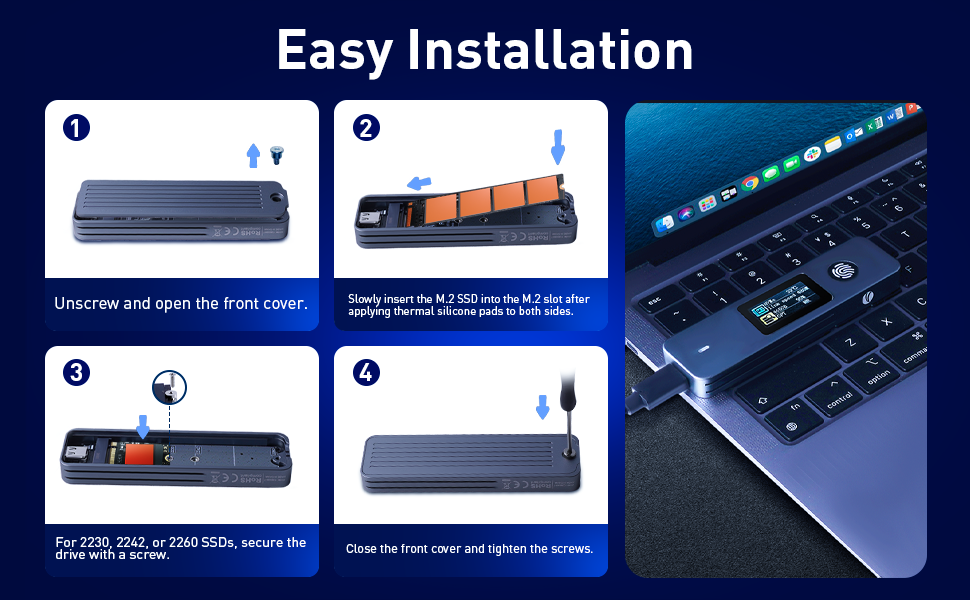
The enclosure supports both M.2 NVMe and SATA SSDs, allowing users to reuse compatible SSDs and build a customized secure storage solution. It supports M-Key and B+M Key SSDs in 2230, 2242, and 2280 sizes.
The premium aluminum alloy body provides durability and improved heat dissipation, while the compact design makes it easy to carry and use across different environments.
Compatible with Windows, macOS, and Android systems, this fingerprint SSD enclosure provides a practical combination of security, portability, and performance.
Compatibility Notes:
Supports M.2 NVMe and SATA SSDs
Compatible with M-Key and B+M Key SSDs
Supports SSD sizes: 2230 / 2242 / 2280
Maximum supported capacity: up to 8TB (depends on SSD compatibility)
Requires a compatible OPAL2 hardware encryption SSD for full hardware encryption functions
Fingerprint unlock works as an authentication method for encrypted storage access
System compatibility: Windows, macOS, Android
SSD encryption features may vary depending on SSD manufacturer and firmware support
Performance Notes:
- USB 3.2 Gen 2 supports transfer speeds up to 10Gbps
- Actual transfer speed depends on:
- SSD performance
- Host device USB interface capability
- Cable quality
- File size and transfer conditions
- Operating system environment
- Thermal performance depends on:
- SSD controller design
- Workload intensity
- Ambient temperature
- Continuous usage duration
- Maximum storage capacity depends on the installed SSD model.
Technical Specifications:
| Specification | Details |
|---|---|
| Interface | USB 3.2 Gen 2 Type-C |
| Supported SSD Types | M.2 NVMe & SATA |
| SSD Interface | M-Key & B+M Key |
| Supported Sizes | 2230 / 2242 / 2280 |
| Data Transfer Speed | Up to 10Gbps |
| Maximum Capacity | Up to 8TB |
| Encryption Technology | OPAL2 Hardware Encryption Support |
| Unlock Method | Fingerprint Authentication |
| Material | Aluminum Alloy |
| LED Indicators | Power Indicator / Operating Status Indicator |
| Dimensions | 106mm × 32mm × 13.5mm |
| Weight | Approx. 58g |
| Compatible Systems | Windows / macOS / Android |
What's in the Box?
- 1 × VCOM Fingerprint SSD Enclosure
- 1 × USB-C Cable
- 1 × User Manual
- 1 × Screwdriver (if applicable)
Use Cases:
For Business Professionals
Secure contracts, customer documents, financial files, and confidential business information while working remotely or traveling.
For Content Creators
Protect creative assets including raw footage, design files, photography collections, and project archives.
For IT Professionals
Create portable encrypted storage solutions for secure file transfer, backup, and device management.
For Everyday Users
Keep personal photos, videos, private documents, and important memories protected with convenient fingerprint access.
Why Choose VCOM Fingerprint SSD Enclosure?
The VCOM Fingerprint SSD Enclosure combines hardware-level encryption, fingerprint authentication, high-speed transfer, and portable design into one secure storage solution.
It is more than just an SSD enclosure—it is a personal encrypted vault designed for people who need to carry important data safely without sacrificing convenience.
From business documents to creative projects, VCOM helps you keep valuable information protected wherever you work.
Order Today!
Protect your important files with VCOM Fingerprint SSD Enclosure. Experience secure portable storage with OPAL2 hardware encryption, fingerprint unlock convenience, and high-speed 10Gbps performance—built for professionals, creators, and anyone who values data privacy.
In stock
Couldn't load pickup availability
Pay with Ease
Trusted Delivery


Fast, Free Shipping
Fast, Free Shipping
We offer free worldwide shipping straight to your door.
Your package will usually arrive within 7–15 business days, so you can sit back and enjoy a worry-free shopping experience.
For more details, please see our Shipping Policy.
Lifetime Customer Support
Lifetime Customer Support
We’re Always Here for You.
If you have any questions or need assistance, please don’t hesitate to reach out at support@vcom.hk




Secure Storage Without Sacrificing Speed
Security should not slow down your workflow. Equipped with USB 3.2 Gen 2 Type-C connectivity, the enclosure supports transfer speeds up to 10Gbps, allowing fast access to large files while keeping your data protected. Transfer videos, design assets, business files, and backups efficiently with a balance of speed and security.

Dual Protocol Support – NVMe & SATA Compatibility
Designed for flexibility, the enclosure supports both M.2 NVMe and SATA SSDs with M-Key and B+M Key interfaces. Reuse your existing SSDs and create a secure portable drive from compatible M.2 storage. Supported sizes: M.2 2230 M.2 2242 M.2 2280

Up to 8TB Portable Storage Expansion
Support for SSD capacities up to 8TB provides plenty of room for professional files, high-resolution videos, photos, software libraries, games, and large backups. Create your personal encrypted storage solution without relying on cloud subscriptions or external services.

Status Indicators for Easier Monitoring
Built-in LED indicators provide quick visibility of power and operating status, helping users understand connection activity during daily use. (If equipped with display/status monitoring features, users can easily check device information such as operating status and storage conditions.)

OPAL2 Hardware Encryption with Fingerprint Unlock
Built with OPAL2 hardware encryption support, this SSD enclosure protects your data at the storage level rather than relying only on software-based security. The fingerprint sensor works as an authorized unlock method, allowing verified users to unlock access to the encrypted SSD. Your fingerprint does not simply lock files—it authenticates access to the hardware-encrypted storage environment. Note: Hardware encryption performance and features depend on the SSD’s encryption capability and compatibility.

Portable Private Vault for Your Important Data
Keep your sensitive files protected wherever you go. The VCOM Fingerprint SSD Enclosure transforms your M.2 SSD into a secure portable storage vault, ideal for business documents, contracts, customer files, creative projects, financial records, and personal data. Whether traveling for work or managing large creative files, you can carry your important data with greater confidence and convenience.

Compact and Travel-Friendly Design
Measuring only 106mm × 32mm × 13.5mm and weighing approximately 58g, the enclosure is lightweight and portable. Keep your encrypted files with you during business trips, client meetings, creative sessions, or everyday work.
Video
Specifications
- Model
- CU855SN-F
- Color
- Gray
- Host Connectors
- 1xUSB Type-C
- USB Version
- USB 3.2 GEN2
- M.2 Slot
- 1xM.2 KEY M
- Protocol
- NVMe & SATA
- Data Transfer Speed
- Up to 10Gbps
- Max Capacity
- 8TB
- SSD Compatibility
- M.2 NVMe M Key&B+M Key SSD
- Supported SSD SIZE
- 2230/2242/2280
- Power Retention Time
- <1s
- Plug and Play
- Yes
- LED Indicators
- Power indicator, Operating status indicator
- Encrypted
- Fingerprint Encryption
- Compatible system
- Windows, Mac OS, Android
- material
- Aluminum alloy
- Bare Weight
- 58.0g
- Dimensions
- 106mm x 32mm x 13.5mm (LxWxH)
- Additional Features
- Operating status display
User Manual
VCOM Fingerprint Encrypted SSD Enclosure -
FAQ
- Choosing a selection results in a full page refresh.
- Opens in a new window.